


API Rate Limit Exceeded: What It Means and How to Fix It
Sponsored Advertising Content |

API rate limit exceeded means that you, or an app you’re using, sent more requests to a service than it allows in a set time. The service has stopped answering for a while. Think of it as a speed limit: annoying, temporary, and almost always something that clears on its own.
This guide explains the message in plain words, shows a real one I captured, and walks through the fixes. Some are for people who just saw the error in an app. The rest are for people who write the code.
What does API rate limit exceeded mean?
An API is the way one program asks another for data. If that’s new to you, articsledge has a plain guide to what an API is. Every request counts against an allowance, such as 60 requests an hour. Go over it, and the service refuses new requests until the clock resets.
The official signal is HTTP status code 429, named Too Many Requests. The standard that defines it, RFC 6585, says it means the user has sent too many requests in a given amount of time. It adds that the reply may include a Retry-After header that says how long to wait.
Every provider lists the codes it sends in its docs, so that’s the first place to look when you see one. The APIFreaks API documentation, from the team I work on, has a section on status codes and HTTP error responses, for example.
You’ll meet the same thing under other names: “429 Too Many Requests”, “rate limit error”, “request rate limit exceeded” or just “too many requests”. They all mean one thing: slow down.
A real rate limit error, captured on November 18, 2026
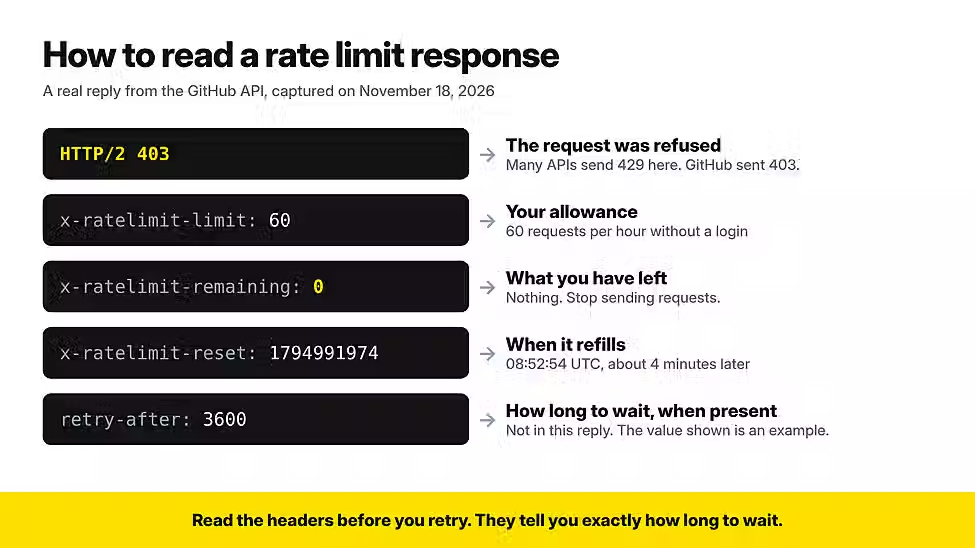
To show you a real one, I called GitHub’s public API without logging in. GitHub’s documentation allows 60 requests an hour for callers like that, counted per IP address. Here’s the reply, trimmed to the lines that matter:
HTTP/2 403
x-ratelimit-limit: 60
x-ratelimit-remaining: 0
x-ratelimit-used: 60
x-ratelimit-reset: 1794991974

{"message":"API rate limit exceeded for [IP address]. (But here's the good news:
Authenticated requests get a higher rate limit. Check out the documentation for more details.)"}
Two things in that reply deserve a closer look.
The status code is 403, not 429. GitHub’s docs say it can send either one when you pass the limit. So read the message and the headers, and don’t rely on the number alone.
I hadn’t sent 60 requests. My test machine shares its IP address with other users, and together they had used the hour’s allowance before I arrived. The same thing happens in offices, on cloud servers and behind a VPN. When a service counts by IP address, everyone on that address shares one allowance.
Why APIs limit requests
It isn’t personal. OpenAI’s rate limit guide gives three reasons, and they apply to almost every API:
To block abuse. Someone could flood the service with requests to knock it over.
To keep access fair. One very heavy user shouldn’t slow the service down for everyone else.
To manage the load. A sudden jump in traffic can strain the servers, and a limit keeps things steady.
How to read the response before you retry
The reply usually tells you how long to wait. Look for these headers.
Header | What it tells you | Example |
Retry-After | How long to wait. MDN’s reference says the value is either a number of seconds or a date. | 3600 |
x-ratelimit-limit | Your allowance for the time window | 60 |
x-ratelimit-remaining | How many requests you have left | 0 |
x-ratelimit-reset | When the allowance refills, as a UTC timestamp in seconds | 1794991974 |
In my capture, the reset value worked out to 08:52:54 UTC, about four and a half minutes after my request. That was exactly how long I had to wait.
The three x-ratelimit names are GitHub’s. Other providers use slightly different ones, so check their docs. A shared standard is on the way: an IETF draft, last updated in May 2026, defines RateLimit and RateLimit-Policy headers. It isn’t final yet.
Seeing it in an app? What to do if you don’t write code
If an app, a browser extension or a website shows you this error, nothing is wrong with your device. The app has used up its allowance, or yours.
Wait. Limits reset on a timer, often within a minute to an hour.
Stop refreshing. Each retry is one more request, and it can keep you over the limit.
Sign in if you can. Services often give signed-in users a bigger allowance. GitHub’s jumps from 60 to 5,000 requests an hour.
Try another network. On a shared office connection or a VPN, you may be sharing one allowance with strangers.
Still stuck after an hour? Tell the app’s support team. The fix is on their side.
How to fix it in your code
Work through these in order. The first two get you moving again. The rest keep the error from coming back.
1. Wait as long as the server tells you
If the reply has a Retry-After header, wait at least that long. OpenAI’s guide says to treat the value as a minimum and add a small random delay on top. With GitHub, wait until the time in x-ratelimit-reset. If you find neither, GitHub’s advice is to wait at least a minute.
2. Retry with exponential backoff and jitter
When there’s no header, use exponential backoff: wait a little after the first failure, then double the longest wait after each new one. Add jitter, which is just a random amount of delay. It stops a hundred clients that failed together from all retrying at the same instant. Amazon’s engineers showed why jitter matters in 2015, and Amazon still builds its client libraries this way.

Here’s a small Python function that does both. I ran it against a test server that returned two 429 errors and then a success, and it got through on the third try.
import random, time, requests

def get_with_retry(url, max_tries=5, base=1, cap=30):
    for attempt in range(max_tries):
        r = requests.get(url, timeout=10)
        if r.status_code not in (429, 503):
            return r
        if attempt == max_tries - 1:
            # last try failed, so stop without waiting again
            return r
        retry_after = r.headers.get("Retry-After", "")
        if retry_after.isdigit():
            # the server's minimum, plus a little
            wait = int(retry_after) + random.uniform(0, 1)
        else:
            # backoff with jitter
            wait = random.uniform(0, min(cap, base * 2 ** attempt))
        time.sleep(wait)
Two rules keep this safe. Cap the number of tries, so a broken service can’t trap your program in a loop. And don’t retry errors that waiting can’t fix, such as a used-up monthly quota or an unpaid bill. OpenAI’s guide makes the same point.
3. Stop asking for the same thing twice
The cheapest request is the one you never send. If an answer won’t change in the next minute, store it and reuse it. GitHub’s best practices go a step further. With a conditional request you ask “has this changed?”, and when you’re signed in, an unchanged answer doesn’t count against your main limit. GitHub also suggests webhooks, where the service tells you when something changes and you stop checking on a timer.
4. Send requests in a steady line, not a burst
Bursts trip limits that steady traffic never touches. GitHub recommends sending requests one after another through a queue, and it allows no more than 100 requests running at the same time.
5. Sign your requests
Unsigned requests get the smallest allowance, and they share it with everyone on the same IP address. Add your API key or token. On GitHub, that one change lifts you from 60 to 5,000 requests an hour.
6. Ask for a higher limit
If you still hit the wall, you may simply need a bigger plan. Check the provider’s limits page first. Some raise your limits automatically as your usage grows, which is how OpenAI’s usage tiers work.
Rate limits, quotas and credits are not the same thing
People mix these three up, and each one needs a different fix.
Term | What it caps | How it clears |
Rate limit | How fast you send requests, per minute or per hour | By itself, when the time window resets |
Quota | How much you can use over a longer period, such as a month | When the period ends, or when you upgrade |
Credits | A prepaid balance that every call draws from | When you buy more |
Waiting fixes a rate limit. It won’t fix an empty quota or an empty balance.
Credit systems differ on one detail that matters for retries: whether a failed call costs you anything. APIFreaks, where I work, uses one credit balance across all of its APIs. Its pricing page explains that credits used on a request are restored when the API returns an error, so a failed call costs nothing. Every reply also carries an X-AF-Credits-Cost header that shows what the call cost. Whichever provider you use, check that detail before you write your retry code.
AI APIs count tokens as well as requests
AI services add a twist. They limit how much text you send, and not only how many requests. A token is a small piece of text that the model reads. OpenAI measures requests per minute and tokens per minute, among other things, and you hit the limit on whichever runs out first.
So twenty short requests can use up a per-minute request limit while your token allowance is barely touched. A handful of very long prompts can do the opposite. Log both numbers, because the fix depends on which limit you hit. If you’re building on these services, articsledge’s guide to AI APIs is a good next read.
Quick answers
Is “429 Too Many Requests” the same as API rate limit exceeded?
Yes. 429 is the standard status code, and “API rate limit exceeded” is a message many services put in the reply. A few services, GitHub among them, sometimes send 403 with the same message.
How long does a rate limit error last?
Until the time window resets. That’s up to an hour on GitHub’s public API and often about a minute on AI APIs. The Retry-After or reset header gives you the exact time.
Why did I hit the limit after only a few requests?
You’re probably sharing an allowance through an IP address or an API key. You may also have hit a different limit, such as tokens per minute or requests running at the same time.
Does retrying faster help?
No. Every retry counts as a request, so it keeps you over the limit for longer.
Does a rate limit error mean I did something wrong?
Usually not. Limits are a normal part of every public API, and well-built apps expect them.
What to remember
The error means you asked too often, too fast. It clears when the time window resets.
Read the reply before you retry. The headers tell you how long to wait, and the message tells you which limit you hit.
In code, wait, back off with jitter, cache what you can and sign your requests. If the limit keeps biting after that, you need a bigger plan, not a faster retry.


