


What Is Function as a Service (FaaS)? How It Works, Pros & Cons, Use Cases, Costs, and Top Platforms (2026)
Every backend team eventually hits the same wall: a webhook that fires ten times an hour except when it fires ten thousand times in a minute, a nightly cleanup job that does not deserve its own server, an image upload that just needs one quick transformation before it lands in storage. Provisioning and babysitting a server for work that shows up unpredictably wastes money when it's idle and scrambles when it isn't, which is the exact problem Function as a Service was built to solve.
TL;DR
Function as a Service (FaaS) runs individual functions in response to events and bills for actual execution time, not idle server capacity.
Its biggest strength is automatic scaling for bursty, event-driven workloads; its biggest trade-off is cold-start latency and strict execution limits.
Pricing typically combines a per-request charge with a per-GB-second or per-vCPU-second compute charge, though Cloudflare, Vercel, and Netlify each price differently.
AWS Lambda, Azure Functions, Google Cloud Run functions, Cloudflare Workers, Vercel Functions, and Netlify Functions are the platforms most commonly compared today.
FaaS fits event-driven, bursty workloads well; it fits continuously busy, high-utilization workloads poorly.
What Is Function as a Service (FaaS)? (Quick Answer)
Function as a Service (FaaS) is a cloud computing model where a provider runs individual functions in response to events, such as an HTTP request or a file upload, and automatically manages the servers, scaling, and capacity. Developers write and deploy code without provisioning infrastructure, and billing is based on actual execution time rather than reserved server capacity.
Where is your organization today with FaaS/serverless functions?
0%Using in production
0%Running pilots or proofs of concept
0%Evaluating FaaS
0%Used it previously but moved away
Table of Contents
What Is Function as a Service (FaaS)?
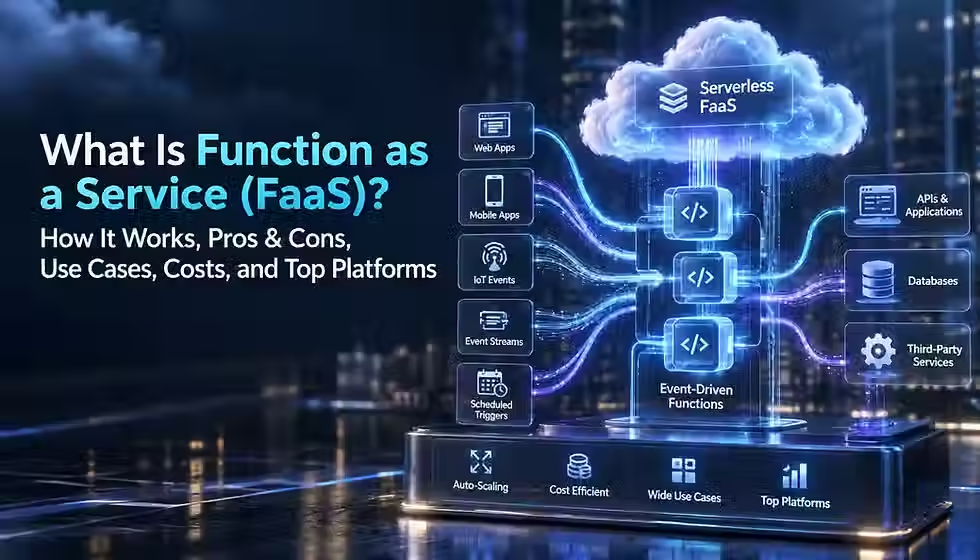
Function as a Service (FaaS) is a cloud computing model in which a provider runs individual pieces of application code, called functions, in response to events, and automatically handles the servers, scaling, and capacity behind them. You write a function, deploy it, and the platform takes care of provisioning compute, routing the triggering event to it, running it, and shutting it back down. You are billed for the time the function actually runs rather than for a server that sits on standby.
FaaS is the compute layer most people mean when they say "serverless functions." Servers still exist somewhere, but the provider owns them: patching, capacity planning, and idle-time waste move off your plate. What is left for the developer is the function's logic, its configuration, and the event sources that trigger it.
A simple mental model: think of FaaS as a vending machine for compute. You do not own or maintain the machine. You put in a coin, an event, and it dispenses a specific output, a function execution, then resets to idle. AWS Lambda, Microsoft Azure Functions, Google Cloud Run functions, Cloudflare Workers, Vercel Functions, and Netlify Functions are all commercial implementations of this idea, though as later sections explain, they differ enough in execution model that treating them as interchangeable is a mistake.
How Does FaaS Work?
A FaaS platform moves a request through a fairly consistent lifecycle, even though the exact mechanics differ by provider:
A developer writes function code in a supported runtime, such as Node.js, Python, Go, Java, or .NET.
The code is deployed, and the platform packages or builds it into a runnable artifact behind the scenes.
An event occurs somewhere: an HTTP request, a new file in object storage, a message on a queue, or a scheduled timer.
A trigger binds that event source to the function and routes the event to the platform's execution layer.
The platform provisions a new execution environment or reuses a warm one that is already initialized.
Configuration, environment variables, and secrets are loaded into that environment.
The function executes, often calling out to databases, APIs, or storage services to do real work.
The platform captures logs, metrics, and traces from the execution.
The response, if any, is returned to the caller or the triggering service.
Concurrency scales up or down automatically as event volume changes, and idle execution environments are eventually reclaimed.
The person operating the function never provisions a virtual machine, configures an operating system, or manually sets an autoscaling policy. The provider's control plane does that work, in exchange for constraints on how long a function can run and how much memory or CPU it can use in a single invocation.
FaaS Architecture: Core Components
A working FaaS system is more than just the function itself. A typical architecture includes:
Event source — the origin of a triggering event, such as an API gateway, a storage bucket, or a message broker.
Trigger — the binding that tells the platform which function should run for a given event type.
Function — the unit of deployed code, usually small and focused on one task.
Execution environment — the sandboxed runtime, container, or microVM the function runs inside.
API gateway — for HTTP-triggered functions, the layer that handles routing, authentication, and rate limiting before a request reaches the function.
Queues, event buses, and pub/sub systems — asynchronous transport for events between services.
External state and databases — since functions are treated as stateless between invocations, anything that must persist lives outside the function, in a database, cache, or object store.
Secrets and identity — credentials and access policies, usually managed through a dedicated secrets manager and IAM roles.
Observability — logs, metrics, and distributed traces that let a team see what happened across a chain of function calls.
Because state lives outside the function, the database or cache often becomes the real bottleneck in a FaaS system, a point covered later under scaling and concurrency.
What Happens During a Function Invocation?
Zooming in on a single invocation clarifies where cost and latency actually come from. When an event arrives, the platform checks whether a warm execution environment already exists for that function. If one does, it reuses it, a warm start. If not, it provisions a new one, initializes the runtime and any global code outside the handler, and then runs the handler, a cold start. Execution time is generally measured from when the handler begins running, not from when the platform starts provisioning the environment, though provisioning latency is still felt by the caller. The function then returns a value, throws an error, or times out. The platform records duration, memory used, and outcome, and either keeps the environment warm for a short window in case another event arrives soon, or begins tearing it down.
This lifecycle is why FaaS pricing is built around GB-seconds or vCPU-seconds rather than a flat hourly server rate: the meter is tied to actual execution, not to how long a server exists.
FaaS vs Serverless Computing: What's the Difference?
FaaS and serverless are related but not identical. Serverless is the broader operating model: any managed cloud service where the provider handles server management, patching, and scaling, and billing follows usage rather than reserved capacity. FaaS is one compute style inside that broader category, specifically the one built around short-lived, event-triggered functions.
Managed databases, object storage, authentication services, and API gateways are commonly described as serverless too, even though they are not FaaS, because you never provision a server for them either. A useful way to hold the distinction: all FaaS is serverless, but not all serverless is FaaS. When people say "serverless" and mean specifically "functions that run my code on events," they are really talking about FaaS.
FaaS vs BaaS, PaaS, Containers, Kubernetes, and VMs
FaaS sits among several other compute and platform models, and the differences matter when choosing an architecture.
FaaS vs Backend as a Service (BaaS)
Backend as a Service (BaaS) provides ready-made backend capabilities, authentication, databases, file storage, and push notifications, accessed directly from client applications, often with little or no custom server-side code. FaaS provides compute: you still write and run your own logic. In practice, many real applications combine both, using BaaS for common backend needs and FaaS for custom business logic that BaaS does not cover out of the box.
FaaS vs Platform as a Service (PaaS)
A PaaS, such as a traditional app-hosting platform, runs a long-lived application process that you deploy as a whole unit. FaaS runs individual functions that start and stop per event. PaaS generally gives you more control over the running process and fewer cold-start surprises, at the cost of paying for capacity even when traffic is low. FaaS billing tracks execution far more precisely, but the deployment unit is smaller and more fragmented.
FaaS vs Containers and Container as a Service (CaaS)
Containerization packages an application with its dependencies into a portable image that can run consistently across environments. A container-based service typically keeps a process running continuously and gives you far more control over the runtime, networking, and installed dependencies than a FaaS function does. FaaS trades that flexibility for simplicity: no container image to manage, no base OS to patch, and billing that drops to zero when nothing is happening. Some FaaS platforms, including Google Cloud Run functions and AWS Lambda, now accept container images as a deployment format, blurring this line at the packaging level while keeping the event-driven, scale-to-zero billing model underneath.
FaaS vs Kubernetes
Kubernetes is a container orchestration platform that gives teams fine-grained control over networking, scheduling, storage, and scaling policy, usually for long-running, complex, multi-service systems. That control comes with real operational overhead: cluster management, node upgrades, and capacity planning. FaaS removes almost all of that overhead for workloads that fit its event-driven, short-execution shape, but it is a poor substitute for Kubernetes when an application needs custom networking, long-running processes, or specialized scheduling that Kubernetes was built to provide.
FaaS vs Virtual Machines
Virtual machines give full control over the operating system and are billed largely by the hour or second regardless of whether they are doing useful work. FaaS abstracts the operating system away entirely and bills by execution. VMs remain the right choice for workloads that need custom kernels, licensed software with specific installation requirements, or consistently high, predictable utilization where a dedicated instance is more cost-effective than per-invocation billing.
Key Benefits of FaaS
No server management — patching, provisioning, and capacity planning move to the provider.
Automatic scaling — the platform adds execution environments as event volume rises and removes them as it falls, without manual intervention.
Scale to zero — idle functions generally cost nothing to keep deployed, which suits spiky or unpredictable traffic.
Fast iteration — small, independently deployable functions can ship faster than a monolithic release process.
Native event integrations — most cloud providers wire FaaS directly into their storage, queue, and messaging services, cutting integration glue code.
Independent deployment — one function can be updated without redeploying an entire application.
Good fit for intermittent workloads — a webhook handler that fires a few hundred times a day does not need a server running 24 hours to catch it.
None of these benefits are universal. Automatic scaling, for instance, is bounded by account-level concurrency limits and by whatever a function calls downstream, a point the scaling section below covers directly.
Disadvantages and Limitations of FaaS
Cold starts — a function that has not run recently may add startup latency to the first request that reaches it.
Execution and runtime limits — most FaaS platforms cap maximum duration, memory, and payload size, which rules out long-running batch jobs.
Debugging complexity — a chain of functions triggering other functions through queues and events is harder to trace locally than a single running process.
Provider quotas and throttling — concurrency limits can cap how fast a function scales during a genuine burst.
Vendor lock-in risk — proprietary triggers, IAM models, and event formats make moving a FaaS-heavy application between providers nontrivial.
Statelessness constraints — anything that must persist between invocations has to live in an external store, adding an extra network hop.
Downstream bottlenecks — a database with a fixed connection limit can become the real ceiling on how far a function can scale, even though the function itself scales freely.
Cost unpredictability at high, sustained volume — per-invocation and per-GB-second pricing that looks cheap at low volume can exceed the cost of a dedicated server once traffic is large and constant.
Common FaaS Use Cases and Examples
FaaS fits workloads that are event-driven, bursty, or naturally short-lived. Representative examples:
REST and HTTP API backends — a function behind an API gateway handles each request independently, scaling with traffic without a dedicated always-on server.
Webhook handlers — a payment provider or SaaS tool posts an event, such as a completed checkout, and a function validates and records it. This fits FaaS well because webhook traffic is inherently bursty and unpredictable.
File and media processing — an image uploaded to object storage triggers a function that generates a thumbnail or transcodes a video, work that is naturally chunked per file.
Scheduled and cron jobs — a nightly cleanup or report-generation task runs on a timer trigger without a server sitting idle the rest of the day.
ETL and data transformation steps — a function can normalize or reshape a batch of records as they arrive, especially as one stage in a larger pipeline.
Queue and event-stream consumers — a function drains a queue or stream, processing messages as they appear rather than polling continuously.
IoT event handling — device telemetry arriving irregularly maps naturally onto per-event functions rather than a constantly running listener.
Notifications and automation — sending an email, a push notification, or a Slack message in response to an application event.
Event-driven microservices — small, independently deployable services that react to domain events rather than serving continuous traffic.
Lightweight AI orchestration — pre-processing input, calling a model API, and post-processing the response, particularly when the surrounding logic is short and the heavy lifting happens in an external model service.
In each of these, the workload is naturally short, triggered by a discrete event, and does not need to hold state in memory across requests, which is exactly the shape FaaS billing and execution rewards.
When FaaS Is the Wrong Choice
FaaS is not a universal replacement for other compute models. It tends to be a poor fit when:
A workload runs continuously at high, predictable utilization, where a reserved instance or container often costs less per unit of work than metered per-invocation billing.
A single task needs to run far longer than the platform's maximum execution duration, ruling out large batch jobs or long video renders in a single invocation.
The application needs a specific kernel, GPU driver, or system-level dependency that the platform's managed runtime does not expose.
The workload is heavily stateful and would suffer from routing every read and write through an external store instead of local memory.
Latency requirements cannot tolerate any cold-start variance, even an occasional one, such as certain high-frequency trading or hard real-time systems.
Splitting logic into many small functions would fragment a system that is easier to reason about, deploy, and debug as a single service.
What is the biggest obstacle to using FaaS more broadly?
0%Cost unpredictability
0%Cold starts & latency
0%Vendor lock-in
0%Debugging & observability
How FaaS Scaling, Concurrency, and Cold Starts Work
FaaS platforms scale by adding parallel execution environments as concurrent events arrive, and removing them as demand falls. This is largely automatic, but it is not unlimited: every provider enforces an account- or function-level concurrency ceiling, and exceeding it results in throttling rather than unconstrained scaling.
A cold start is the added latency when a platform has to provision a fresh execution environment rather than reuse a warm one; it includes initializing the runtime, loading dependencies, and running any code outside the handler before the handler itself executes. A warm start reuses an already-initialized environment and skips most of that overhead. Cold-start duration is shaped by runtime choice, package size, and how much work happens at initialization; interpreted languages with small dependency trees generally start faster than runtimes that need heavier initialization. Providers mitigate this with features such as provisioned or reserved concurrency, which keep a set number of environments warm continuously for a fee, and with faster underlying execution technology. Whether a cold start matters at all depends entirely on the workload: an internal batch job triggered by a queue rarely notices an extra few hundred milliseconds, while a synchronous, user-facing API call might.
Scaling also depends on what a function calls. A function itself can scale into the thousands of concurrent executions, but if every invocation opens a new connection to a relational database with a fixed connection limit, the database exhausts its connections long before the function hits its own concurrency ceiling. This is why FaaS architectures commonly add a connection pooler, a proxy, or a queue in front of stateful downstream services, rather than relying on the function's own scaling alone.
FaaS Security, Reliability, and Observability
Security in FaaS follows the shared responsibility model: the provider secures the underlying infrastructure and runtime isolation, while the developer is responsible for the function's code, its permissions, and how it handles data. Sound practice includes:
Least-privilege IAM — granting a function only the specific permissions it needs, not broad account-wide access.
Secrets management — pulling credentials from a dedicated secrets manager rather than hardcoding them or storing them in plain environment variables where avoidable.
Dependency hygiene — keeping third-party packages patched, since a function's supply chain is as much an attack surface as its own code.
Input validation — treating every event payload as untrusted, especially for functions triggered by public HTTP endpoints or webhooks.
Private networking — using VPC or private-network integration where a function must reach internal resources that should not be exposed publicly.
Careful logging — avoiding sensitive data in logs, since log storage often has broader access than the application itself.
Reliability in an event-driven system depends on how failures are handled downstream of the function. Most platforms retry failed asynchronous invocations automatically, which means a function can receive the same event more than once, so idempotency, designing a function so processing the same event twice produces the same result as processing it once, matters more in FaaS than in a typical long-running service. Dead-letter queues capture events that fail repeatedly so they are not silently dropped, and correlation IDs threaded through logs make it possible to follow one request across a chain of functions, queues, and services. Observability tooling, logs, metrics, and distributed traces, is what makes an event-driven chain debuggable at all; without it, a failure three functions downstream from the original trigger can be extremely hard to trace back to its source.
How Much Does FaaS Cost?
Pricing checked: September 15, 2026. Prices, allowances, limits, and billing models can change and may vary by region, architecture, plan, or workload. Always verify the provider's current pricing documentation before making a purchasing decision.
Most FaaS platforms bill on a similar underlying formula: total compute cost = memory or CPU allocated × execution duration × number of invocations, expressed in a unit such as GB-seconds or vCPU-seconds, plus a small per-invocation request charge. The complete cost picture, though, extends well beyond that headline meter:
Invocation or request charges, separate from duration.
Memory and, on some platforms, CPU allocated per invocation.
Provisioned or "always ready" capacity kept warm to avoid cold starts.
Outbound data transfer and egress, billed separately from compute on most platforms.
API gateway costs for HTTP-triggered functions.
Queues, event buses, and pub/sub services that sit around the function.
Build and container-registry costs where a function is deployed as a container image.
Logging, monitoring, and tracing retention.
Database and third-party API calls the function makes downstream.
AWS Lambda charges $0.20 per one million requests plus roughly $0.0000166667 per GB-second of compute on x86, about 20% less on Arm-based Graviton, after a permanent free tier of one million requests and 400,000 GB-seconds per month.
Azure Functions on the Consumption plan charges a comparable $0.20 per million executions and about $0.000016 per GB-second, with the same free-grant shape. The newer Flex Consumption plan, which Microsoft now recommends for new apps, adds private networking and per-instance memory sizing, with its own free monthly grant of 250,000 executions and 100,000 GB-seconds and a higher per-unit rate once that grant is used.
Google Cloud Run functions, the current name for what was Cloud Functions, bills per invocation plus vCPU-seconds and GiB-seconds of active compute, rounded up to the nearest 100 milliseconds, after a free tier that covers roughly two million requests a month along with a monthly allotment of vCPU and memory time.
Cloudflare Workers uses a flatter model: a free plan with 100,000 requests per day and a 10-millisecond CPU-time cap per invocation, and a Workers Paid plan starting at $5 a month, including 10 million requests and 30 million CPU-milliseconds, with additional usage billed per million requests and per million CPU-milliseconds beyond that.
Vercel Functions, running on Vercel's Fluid compute model, bills active CPU time, provisioned memory in GB-hours, and invocations separately, with CPU billing pausing while a function is waiting on I/O rather than charging for wall-clock time. This model, detailed further in Vercel's Fluid compute documentation, generally rewards I/O-heavy functions and sits on top of Vercel's platform subscription and included usage credit.
Netlify Functions moved to credit-based billing in September 2025: function compute consumes credits per GB-hour alongside bandwidth, build, and other usage drawn from the same monthly credit pool, rather than being billed as a standalone per-invocation line item. Accounts created before that date can remain on legacy per-meter pricing.
Because Cloudflare, Vercel, and Netlify price on CPU time, active-CPU time, and shared credits respectively, rather than the GB-second model AWS and Azure use, a direct apples-to-apples price comparison across all six platforms is not meaningful without picking a specific, fully specified workload profile and modeling it against each platform's current calculator.
Illustrative Workload Examples
These are clearly labeled hypothetical examples to illustrate how the formula behaves, not quotes or guaranteed bills. Assumptions: 128 MB to 256 MB memory, short executions, and x86 pricing where relevant.
Low-volume webhook handler — 200,000 invocations a month at 150 milliseconds and 128 MB stays comfortably inside most providers' free tiers, landing at or near $0 on AWS Lambda, Azure Functions, and Google Cloud Run functions, and within Cloudflare's free daily request allowance if traffic is spread evenly.
Bursty medium-volume API — 10 million invocations a month at 200 milliseconds and 256 MB generates roughly 500,000 GB-seconds of compute, which exceeds the free tier on AWS and Azure and produces a bill in the tens of dollars for compute alone, before API gateway, data transfer, and logging costs are added.
High-volume, steady event processing — hundreds of millions of monthly invocations running consistently around the clock is exactly the profile where a dedicated container or reserved instance often becomes cheaper per unit of work than metered FaaS billing, which is the core trade-off covered next.
When FaaS Is Cheaper — and When It Isn't
FaaS tends to be economical when traffic is intermittent, bursty, or highly variable, because you are not paying for capacity sitting idle between events. It becomes less competitive, and sometimes more expensive than a reserved server or container, once a workload runs at high, consistent utilization around the clock, because per-invocation and per-GB-second pricing has no equivalent to a committed-use discount as deep as reserving a whole instance. The practical rule of thumb: model your actual expected invocation volume and duration against current provider pricing before committing to an architecture, rather than assuming FaaS is automatically the cheaper option.
Top FaaS Platforms Compared
The six platforms most commonly discussed as FaaS options today are AWS Lambda, Microsoft Azure Functions, Google Cloud Run functions, Cloudflare Workers, Vercel Functions, and Netlify Functions. They are not all the same category of product: AWS Lambda and Azure Functions are classic hyperscaler FaaS with deep event-source integration; Google Cloud Run functions sits on Google's unified Cloud Run compute platform; Cloudflare Workers is an edge/serverless runtime built on isolates rather than containers or virtual machines; and Vercel Functions and Netlify Functions are developer-platform functions layered onto frontend hosting products. Comparing them fairly means matching the platform to the workload and ecosystem rather than picking a single universal winner.
AWS Lambda
Lambda is the most established FaaS product and the deepest integrated into a single cloud's event ecosystem, with triggers spanning object storage, queues, streams, and over 200 AWS and SaaS event sources. It supports Node.js, Python, Java, Go, .NET, Ruby, and custom runtimes, including container images up to 10 GB. Pricing follows the per-request-plus-GB-second model described above, with a permanent free tier and provisioned concurrency available to reduce cold starts for latency-sensitive workloads. Lambda is the strongest default for teams already standardized on AWS, since IAM, networking, and virtually every other AWS service integrate with it directly. The trade-off is that its event model, IAM structure, and deployment tooling are AWS-specific, which is where most Lambda lock-in actually lives.
Microsoft Azure Functions
Azure Functions offers a similar consumption-based billing model to Lambda, with deep integration into Azure's own storage, queue, and Event Grid services, plus first-class support for .NET and strong C# tooling. Microsoft now recommends the newer Flex Consumption plan over the classic Consumption plan for new applications, since it adds private networking and configurable instance memory while keeping serverless, pay-for-what-you-use billing. Azure Functions is the natural fit for teams already running on Azure or invested in the .NET ecosystem, particularly where private networking or enterprise identity integration with Entra ID matters.
Google Cloud Run Functions
Formerly Cloud Functions, this product was folded into the broader Cloud Run platform and renamed Cloud Run functions in 2024, reflecting Google's move toward a single unified serverless compute surface that spans both container services and single-purpose functions. It bills per invocation, vCPU-second, and GiB-second, with a comparatively generous free tier. Cloud Run functions is a strong choice for teams already on Google Cloud, particularly those using Pub/Sub, BigQuery, or other Google-native event sources, and for teams that want the option to graduate a function into a full Cloud Run container service without switching platforms.
Cloudflare Workers
Workers runs on V8 isolates distributed across Cloudflare's global edge network rather than containers or virtual machines, which gives it exceptionally fast cold starts and execution close to end users worldwide. It bills on CPU time rather than wall-clock duration, with a genuinely usable free plan and a $5-a-month paid plan covering meaningful volume. The trade-off for that speed is a more constrained runtime: Workers is built around a Web-standard-style JavaScript and WebAssembly execution model rather than arbitrary language runtimes, and per-invocation CPU time is capped, which pushes long-running or CPU-heavy work elsewhere. Workers suits latency-sensitive, globally distributed HTTP workloads, middleware, and API edge logic better than it suits heavy backend batch processing.
Vercel Functions
Vercel Functions run inside Vercel's frontend-hosting platform, tightly integrated with Next.js and other modern frontend frameworks. Its Fluid compute execution model bills active CPU time separately from provisioned memory and pauses CPU billing during I/O wait, which can meaningfully lower cost for functions that spend most of their time waiting on a database or an external API. Vercel Functions is the strongest fit for teams whose primary deployment target is already Vercel for a frontend framework, where functions serve as the backend-for-frontend layer rather than a general-purpose compute platform.
Netlify Functions
Netlify Functions serve a similar role to Vercel Functions: serverless compute layered onto a Jamstack-oriented hosting and deployment platform, with strong deploy-preview and form-handling features around it. Netlify moved its overall pricing, including function compute, to a credit-based model in September 2025, consolidating bandwidth, builds, and compute into one metered pool rather than billing function invocations as an isolated line item. Netlify Functions fits teams already using Netlify's hosting, deploy-preview, and Jamstack workflow who want backend logic without leaving that platform.
Which FaaS platform does your organization use most today?
0%AWS Lambda
0%Azure Functions
0%Google Cloud Run functions
0%Cloudflare Workers
How to Choose a FaaS Provider
No single FaaS platform is correct for every team. A practical selection framework weighs:
Existing cloud footprint — a team already deep in AWS, Azure, or Google Cloud generally gets the most value staying inside that provider's FaaS product, since IAM, networking, and event sources integrate natively.
Application architecture and framework — a Next.js frontend with light backend logic often fits Vercel or Netlify Functions more naturally than a hyperscaler function.
Latency and geographic distribution needs — globally distributed, latency-sensitive HTTP workloads point toward an edge runtime such as Cloudflare Workers.
Runtime and language requirements — heavier language or dependency needs may rule out edge-isolate runtimes in favor of a full container-based FaaS platform.
Networking and compliance requirements — private VPC access, specific compliance certifications, or enterprise identity integration can narrow the field quickly.
Observability and ecosystem tooling — how well a platform's logs, metrics, and tracing integrate with a team's existing monitoring stack.
Expected traffic shape and cost model — steady high volume versus bursty low volume points toward different pricing models entirely, as the cost section above covers.
Portability priorities — teams that weight multi-cloud portability heavily may prefer to isolate FaaS-specific code behind an abstraction layer, accepting some added complexity in exchange for easier migration later.
Should You Use FaaS?
FaaS is worth adopting when most of the following are true: the workload is genuinely event-driven, traffic is bursty or unpredictable rather than constantly high, the team wants to minimize server and capacity management, individual functions can stay reasonably independent of one another, the platform's runtime and duration constraints fit the task, and external state is an acceptable trade-off for automatic scaling.
Signals that another compute model may serve better include workloads that run continuously at high utilization, tasks that need to run far longer than the platform's maximum duration, applications that depend on specialized kernels or system-level access, heavily stateful systems that would suffer from routing everything through external storage, and hard real-time latency requirements that cannot tolerate any cold-start variance. In practice, most production systems end up mixing models: FaaS for event-driven edges and integrations, containers or a PaaS for the application core, and managed databases or BaaS components for shared backend state.
The Future of FaaS and Serverless Computing
A few directions look reasonably well supported by where providers have been investing. Functions and container platforms continue to converge, as seen in Google folding Cloud Functions into Cloud Run and in Lambda and Cloud Run both accepting container images as a deployment format, blurring the line between "function" and "container service" at the packaging level. Execution models are getting more flexible about billing granularity, as Vercel's active-CPU pricing and Azure's Flex Consumption plan both illustrate, moving away from flat wall-clock billing toward metering what code actually does. Edge and serverless convergence continues, with more providers offering globally distributed execution close to end users rather than a single regional deployment. Cold-start mitigation keeps improving through lighter execution technology and smarter warm-pool management. And FaaS increasingly serves as glue and orchestration around AI workloads, pre-processing input and post-processing output around calls to separately hosted models, rather than running the model inference itself inside the function. None of this is certain, and providers change pricing and product names on their own schedules, which is exactly why the terminology and pricing details above are worth re-verifying against official documentation before you build on them.
FAQ
What does FaaS stand for?
FaaS stands for Function as a Service, a cloud computing model where a provider runs individual functions in response to events and manages the underlying servers, scaling, and capacity automatically.
Is FaaS the same as serverless?
Not exactly. Serverless is the broader category of provider-managed, usage-billed cloud services, which includes managed databases and storage as well as compute. FaaS is specifically the serverless compute style built around short-lived, event-triggered functions. All FaaS is serverless, but not all serverless is FaaS.
Is AWS Lambda a FaaS platform?
Yes. AWS Lambda is one of the original and most widely used commercial FaaS platforms, running functions in response to events from over 200 AWS and SaaS sources and billing per request and per GB-second of compute.
What is an example of FaaS?
A common example is a function that runs automatically whenever a file is uploaded to cloud object storage, generating a thumbnail or scanning the file, then shutting down until the next upload occurs.
What are the main advantages of FaaS?
The main advantages include no server management, automatic scaling, scaling to zero when idle, fast independent deployment of individual functions, and native integration with a provider's event sources such as queues and storage.
What are the disadvantages of FaaS?
Key disadvantages include cold-start latency, strict execution duration and memory limits, harder debugging across distributed event chains, vendor lock-in risk, and cost that can become unpredictable or less competitive at very high, sustained traffic volumes.
Is FaaS stateless?
FaaS functions are generally treated as stateless between invocations, since a platform may tear down or reuse an execution environment at any time. A warm environment can sometimes retain temporary in-memory state between back-to-back invocations, but applications should not rely on that for correctness, and durable state should live in an external database or cache.
What is a cold start in FaaS?
A cold start is the added latency that occurs when a platform has to provision and initialize a fresh execution environment for a function, rather than reusing one that is already warm from a recent invocation.
Is FaaS cheaper than containers?
It depends on the workload. FaaS is usually cheaper for bursty, intermittent traffic because you pay only for actual execution time. For workloads that run continuously at high, steady utilization, a reserved container or instance often costs less per unit of work than metered per-invocation FaaS billing.
When should FaaS be used?
FaaS fits event-driven workloads with bursty or unpredictable traffic, where the team wants to minimize infrastructure management and individual pieces of logic can remain reasonably independent, such as webhook handlers, scheduled jobs, and file-processing triggers.
When should FaaS be avoided?
FaaS is usually a poor fit for continuously busy workloads, tasks that must run longer than the platform's maximum duration, systems needing specialized kernel or hardware access, heavily stateful applications, and hard real-time latency requirements that cannot tolerate cold-start variance.
What is the difference between FaaS and PaaS?
A PaaS runs a long-lived application process that you deploy as a whole unit and generally pay for continuously. FaaS runs individual functions that start and stop per event and bills based on actual execution rather than reserved capacity.
What is the difference between FaaS and BaaS?
BaaS provides ready-made backend capabilities such as authentication, databases, and storage that client applications call directly. FaaS provides compute for custom logic that you write yourself. Many applications use both together.
Can FaaS run long-running workloads?
Generally no. Most FaaS platforms cap maximum execution duration, commonly in the range of several minutes to around fifteen minutes depending on the provider, which makes them unsuitable for a single task that needs to run for hours.
Which FaaS platform is best?
There is no single best platform. AWS Lambda and Azure Functions suit teams already standardized on those clouds, Google Cloud Run functions suits Google Cloud-native teams, Cloudflare Workers suits latency-sensitive edge and global HTTP workloads, and Vercel Functions and Netlify Functions suit teams building on those frontend platforms.
Is FaaS suitable for microservices?
Yes, for event-driven microservices that react to discrete triggers rather than serve continuous traffic. It is less suitable when a microservice needs to hold significant in-memory state or run continuously at high utilization.
Does FaaS cause vendor lock-in?
It can. Proprietary triggers, IAM structures, event formats, and deployment tooling make a FaaS-heavy application harder to move between providers than a portable container would be. Teams concerned about lock-in often isolate provider-specific integration code behind their own abstraction layer.
Key Takeaways
Function as a Service runs individual, event-triggered functions and bills for actual execution time rather than reserved server capacity.
FaaS is a subset of serverless computing, not a synonym for it; serverless also covers managed databases, storage, and other provider-managed services.
Functions are treated as stateless between invocations, so durable state has to live in an external database, cache, or storage service.
Cold starts add latency when a fresh execution environment has to be provisioned, and matter far more for synchronous, user-facing calls than for background processing.
Automatic scaling has real limits: account-level concurrency caps and downstream bottlenecks such as database connections often cap throughput before the FaaS platform itself does.
FaaS tends to be economical for bursty, intermittent workloads and less competitive than a reserved container or instance for continuously busy, high-volume workloads.
AWS Lambda, Azure Functions, Google Cloud Run functions, Cloudflare Workers, Vercel Functions, and Netlify Functions differ enough in execution model and pricing that no single platform is correct for every workload.
Vendor lock-in is a real, manageable risk in FaaS architectures, driven mainly by proprietary triggers, IAM models, and deployment tooling rather than the code itself.
Actionable Next Steps
Classify the workload as event-driven, bursty, or continuously busy before choosing a compute model.
Identify every event source the function needs to react to, and confirm the target platform supports it natively.
Estimate expected invocation volume, average duration, and memory needs to model realistic cost.
Check the platform's maximum execution duration, memory limits, and supported runtimes against the workload's actual requirements.
Calculate total expected cost using current official pricing, including requests, compute, data transfer, and any API gateway or queue costs.
Build a small proof-of-concept function covering the riskiest part of the workload before committing to the architecture.
Test cold-start behavior, concurrency limits, and failure and retry handling under realistic load.
Configure least-privilege IAM roles, secrets management, and logging before deploying to production.
Compare the modeled FaaS cost and operational overhead against a container or managed-service alternative before finalizing the decision.
Glossary
API Gateway — a managed layer that routes, authenticates, and rate-limits HTTP requests before they reach a function.
Autoscaling — automatically adjusting the number of running execution environments based on incoming event volume.
BaaS (Backend as a Service) — ready-made backend capabilities such as authentication and storage, accessed directly by client applications.
Cold start — the added latency when a platform provisions and initializes a fresh execution environment for a function.
Concurrency — the number of instances of a function running at the same time.
Edge function — a function that runs on distributed infrastructure close to end users rather than in a single regional data center.
Event — a discrete occurrence, such as an HTTP request or a new file upload, that can trigger a function.
Event bus — a service that routes events from producers to the functions or services subscribed to them.
FaaS (Function as a Service) — a cloud model where a provider runs individual functions in response to events and manages scaling and infrastructure automatically.
GB-second — a billing unit equal to one gigabyte of memory allocated for one second of execution, used to measure FaaS compute cost.
Idempotency — designing a function so that processing the same event more than once produces the same result as processing it once.
Invocation — a single execution of a function, triggered by one event.
PaaS (Platform as a Service) — a hosting model that runs a long-lived application process you deploy as a whole unit.
CaaS (Container as a Service) — a managed platform for running and orchestrating containers without managing the underlying servers.
Queue — a service that holds messages for asynchronous processing, commonly used to trigger or buffer function invocations.
Runtime — the language environment, such as Node.js or Python, that a function executes in.
Serverless — the broader category of provider-managed cloud services billed by usage rather than reserved capacity, which includes FaaS as well as managed databases and storage.
Stateless — not relying on data held in memory between invocations; durable state lives in an external store.
Trigger — the binding that connects an event source to the function that should run in response.
Warm start — reusing an already-initialized execution environment for a new invocation, skipping most cold-start overhead.
Sources & References
AWS Lambda Pricing — Amazon Web Services — https://aws.amazon.com/lambda/pricing/
Azure Functions Pricing — Microsoft Azure — https://azure.microsoft.com/en-us/pricing/details/functions/
Azure Functions Flex Consumption plan hosting — Microsoft Learn — last updated 2026-09-14 — https://learn.microsoft.com/en-us/azure/azure-functions/flex-consumption-plan
Cloud Run pricing — Google Cloud — https://cloud.google.com/run/pricing
Pricing · Cloudflare Workers docs — Cloudflare — last updated August 28, 2026 — https://developers.cloudflare.com/workers/platform/pricing/
Functions usage and pricing (Fluid compute) — Vercel — https://vercel.com/docs/functions/usage-and-pricing
Fluid compute — Vercel — last updated August 24, 2026 — https://vercel.com/docs/fluid-compute
Credit-based pricing plans — Netlify Docs — https://docs.netlify.com/manage/accounts-and-billing/billing/billing-for-credit-based-plans/credit-based-pricing-plans/


