What Is Sales Automation Software? How It Works, Features, and Best Tools in 2026
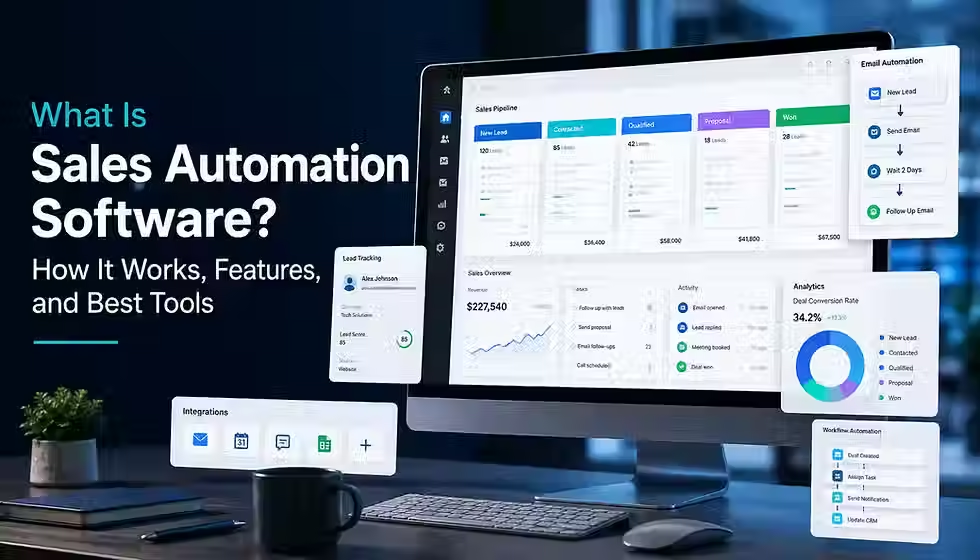
Reps don't lose deals because they're bad at selling. They lose deals because a follow-up email never went out, a hot lead sat unassigned for two days, or the CRM was so out of date that the forecast was fiction. Sales automation software exists to close that gap — not by replacing the conversation, but by making sure the logistics around it never drop the ball. Done well, it buys reps back the hours they lose to admin. Done badly, it turns every prospect interaction into something that obviously came from a robot. This guide covers both sides honestly.
TL;DR
Sales automation software handles repetitive, rules-based sales tasks — lead routing, follow-ups, CRM updates — so reps focus on conversations.
It works on a trigger → condition → action → update loop, whether the tool is a basic CRM workflow or an AI agent.
The strongest use cases are data-driven and repetitive; discovery, negotiation, and judgment calls should stay human-led.
AI adds real value in research, drafting, and prioritization today, but full autonomy in closing deals is not yet reliable.
Pricing spans roughly $15 to several hundred dollars per user per month depending on category and tier — always verify current figures with the vendor.
What Is Sales Automation Software?
Sales automation software is technology that automatically handles repetitive, rules-based sales tasks — such as lead routing, follow-up emails, CRM data entry, and activity logging — based on triggers, rules, or AI recommendations. Businesses use it to respond to leads faster, keep CRM data accurate, and free reps to focus on conversations that require human judgment.
Table of Contents
What Is Sales Automation Software?
Sales automation software is technology that takes over the repetitive, rules-based steps of selling — logging activity, routing leads, sending follow-ups, updating records — so reps spend their time on conversations a computer cannot have. Vendors and analysts use "sales automation" and "sales force automation" (SFA) almost interchangeably today, though SFA is the older term, rooted in the CRM systems of the 1990s that first automated contact and pipeline tracking.
In a modern revenue stack, sales automation software usually sits on top of or alongside the CRM. The CRM is the system of record — it stores accounts, contacts, and deals. The automation layer is the system of action — it watches for triggers in that data and executes steps: sending an email, creating a task, moving a deal stage, or alerting a manager. Some platforms (HubSpot, Salesforce) bundle both in one product. Others (Apollo, Outreach, Clay) automate outreach and sit on top of a separate CRM.
The split between human and automated work is the whole point of the category. A rules engine can decide that a demo request from a company over 200 employees should route to an enterprise AE within two minutes. It cannot decide, mid-call, whether a prospect's hesitation is about budget or timing — that judgment call stays with the rep. A simple example: a demo request lands in the CRM, the system enriches the company record, checks territory rules, assigns the lead to the right account executive, creates a follow-up task, and fires an acknowledgment email — all before the rep has opened their inbox. The rep still runs discovery and decides whether the deal is qualified.
How Does Sales Automation Software Work?
Every sales automation workflow follows the same basic mechanism: data or an event triggers a rule (or an AI model's judgment), which fires an action, which updates a system of record, which in turn can trigger a notification or the next step in the sequence. Understanding this loop — trigger → condition → action → update → measurement — is more useful than memorizing feature lists, because it is the same pattern whether the tool is a $20/month CRM automation or an enterprise AI agent.
The building blocks
Triggers: an event that starts a workflow — a form submission, a stage change, an inbound reply, a set date, or a signal such as a job change.
Conditions: rules that decide which branch a record takes — company size, territory, lead score, or deal value.
Actions: what actually happens — send an email, create a task, assign an owner, update a field, post a Slack alert.
CRM and system updates: the action's result gets written back to the CRM so every team works from the same data.
Human approval points: many workflows pause for a rep or manager to confirm before an email sends or a discount applies.
Closed-loop reporting: the workflow's outcome (opened, replied, booked, ignored) feeds back into scoring and future automation.
A simple end-to-end example
A prospect fills out a "Request a Demo" form. The trigger fires: the record enters the CRM. A condition checks employee count and industry against the ideal customer profile. Based on that condition, the system enriches the contact with firmographic data, assigns it to the correct AE by territory, creates a same-day follow-up task, and sends a branded acknowledgment email. The rep gets a Slack notification. When the rep logs the first call, that outcome updates the lead's status and feeds the reporting dashboard used to tune lead scoring next quarter. No step in that chain required a human until the actual conversation.
What Can Sales Automation Software Automate?
Not every part of a sales process is a good automation candidate. As a rule, automate the parts that are repetitive, data-driven, and time-sensitive; keep humans on the parts that require judgment, empathy, or relationship context.
Strong automation candidates
Lead capture, deduplication, and enrichment from forms, ads, and signups.
Lead scoring and qualification against a defined ideal customer profile.
Lead assignment and routing by territory, size, or product line.
Outbound sequence scheduling across email, LinkedIn, and calls.
Follow-up reminders and task creation after a call or demo.
Meeting scheduling and calendar coordination.
Activity logging — calls, emails, and meetings written to the CRM automatically.
Pipeline stage movement triggered by defined milestones.
Quote and approval workflows for standard discount tiers.
Renewal and upsell reminders based on contract dates or usage data.
Re-engagement of cold or stalled leads on a set cadence.
Handoffs between SDR, AE, and customer success with context attached.
Where humans should stay in charge
Discovery conversations, objection handling, pricing negotiation on non-standard deals, and any message that references something a prospect said personally should stay human-led or human-reviewed. Fully autonomous personalization at scale is where sales automation most often turns robotic — a generic template with a merge tag is not personalization, and prospects notice.
Core Features of Sales Automation Software
Feature lists look similar across vendors, but depth varies enormously. Grouping features by priority helps you evaluate what actually matters for your team rather than checking boxes.
Must-have
Workflow builder for trigger-based automations.
CRM or contact management with a shared record of truth.
Sales sequences and email automation with scheduling controls.
Task automation and reminders.
Basic reporting on activity and pipeline.
Useful
Lead scoring and routing rules.
Meeting scheduling with calendar sync.
Data enrichment from a connected or built-in database.
Mobile access for reps in the field.
Integrations and an open API for the rest of the stack.
Advanced
AI-assisted drafting and next-step recommendations.
Conversation intelligence — call recording, transcription, and deal-risk signals.
Predictive forecasting models.
Governance controls — permissions, audit logs, and approval gates.
Data-quality automation such as deduplication and standardization.
A useful buying heuristic: if a team cannot yet do a workflow manually and consistently, buying advanced AI automation for it usually automates the inconsistency instead of fixing it.
Sales Automation vs. CRM vs. Marketing Automation vs. Sales Engagement
These four categories overlap heavily in 2026, and many platforms (HubSpot, Salesforce) now sell products that blur every line below. Understanding the historical center of gravity for each still helps you evaluate a stack.
CRM
Primary purpose: system of record for accounts, contacts, and deals. Main users: reps and sales managers. Main data: contact and deal records. Typical automation: field updates, stage changes, basic reminders. Example: Salesforce Sales Cloud, Pipedrive.
Marketing automation
Primary purpose: nurture large audiences before they are sales-ready. Main users: marketers. Main data: email lists, campaign engagement, web behavior. Typical automation: drip campaigns, lead scoring at the top of funnel, ad retargeting. Example: HubSpot Marketing Hub, Marketo.
Sales engagement
Primary purpose: execute and track multi-touch outbound sequences at the individual-rep level. Main users: SDRs and AEs. Main data: sequences, call and email activity, reply detection. Typical automation: cadence scheduling, reply-based branching, dialers. Example: Outreach, Salesloft, Apollo.
Sales automation (the umbrella)
Primary purpose: remove manual, repetitive steps anywhere across the sales motion — it draws on CRM data, can trigger marketing-style nurture, and often includes engagement-style sequencing. Main users: RevOps, sales leaders, and reps collectively. The practical distinction that still matters: CRM answers "what is true about this deal," marketing automation answers "how do we nurture someone who isn't ready to buy," sales engagement answers "how do we execute outbound at scale," and sales automation is the connective layer that decides what happens next and does it without a human clicking a button.
Common Sales Automation Use Cases and Examples
Each of these follows the same trigger → automation → human action → outcome pattern.
Inbound lead routing: form submitted → lead scored and assigned by territory → rep calls within the response-time SLA → faster first contact.
Outbound prospecting: ICP list built → multi-channel sequence launches with personalization variables → rep handles replies → more qualified conversations per hour of prep.
Stalled opportunity follow-up: no activity logged for 14 days → system flags the deal and reminds the owner → rep re-engages or updates the forecast → fewer deals silently going dark.
Post-demo follow-up: demo marked complete → recap email and next-step task auto-created → rep personalizes and sends → consistent follow-through instead of it depending on memory.
Pipeline hygiene: deal sits in a stage past the average duration → manager gets an alert → manager coaches or reassigns → more accurate forecasting.
Sales-to-customer-success handoff: deal marked closed-won → CS is auto-assigned with deal notes attached → CS runs onboarding → no lost context at handoff.
Renewal and upsell alerts: contract nears its end date or usage crosses a threshold → account owner is notified → rep opens a renewal or expansion conversation → fewer renewals missed.
Manager visibility alerts: a rep's pipeline coverage drops below target → manager is notified automatically → manager intervenes early — rather than discovering the gap at forecast call.
Benefits of Sales Automation Software
The realistic case for sales automation is efficiency and consistency, not a guaranteed revenue multiplier. Industry data backs the efficiency case: McKinsey research cited across the industry estimates that roughly a third of sales-related tasks can be automated with technology available today (McKinsey & Company, cited via LeadSquared, 2026), and the global sales force automation software market was valued at $12.8 billion in 2026, projected to reach $31.92 billion by 2032 — a 12.1% compound annual growth rate (JustCall, 2026).
Less repetitive manual work — logging, data entry, and follow-up reminders happen without a rep remembering to do them.
Faster response times to inbound leads, which correlates with higher conversion in most published lead-response research.
More consistent follow-up across an entire team instead of depending on individual habits.
Cleaner CRM data because activity gets logged automatically rather than backfilled from memory.
Better pipeline visibility for managers, since stage changes and stalls are surfaced automatically.
Fewer manual errors in routing, data entry, and quote generation.
More reliable handoffs between SDR, AE, and customer success.
More selling time: teams that adopt AI-assisted automation report measurable gains — 83% of sales teams using AI automation report higher revenue, compared with 66% of teams that do not use it, and AI-personalized outreach produces roughly 70% higher response rates than manual outreach in the same analysis (JustCall, 2026).
Treat vendor-published ROI percentages as directional rather than guaranteed — they depend heavily on how clean the starting process and data already were.
Risks, Limitations, and What You Should Not Automate
Automation amplifies whatever it is pointed at — including a bad process. This section is deliberately blunt because most published sales automation content undersells it.
Over-automation: sequencing every lead the same way regardless of fit turns outreach into spam and hurts sender reputation.
Robotic communication: merge-tag personalization that ignores context reads as obviously automated and depresses reply rates.
Inaccurate personalization: AI-drafted messages built on stale or wrong enrichment data can reference outdated jobs or facts, which is worse than generic copy.
Poor data quality: automating on top of duplicate or incomplete records routes leads incorrectly and skews forecasts.
Automation amplifying bad process: if your qualification criteria are wrong, automating them just gets the wrong leads to reps faster.
Incorrect routing: territory or scoring rules that are not maintained send leads to the wrong rep or no rep at all.
Notification overload: too many automated alerts trains reps and managers to ignore all of them, including the ones that matter.
Tool sprawl: stacking five point solutions that do not talk to each other recreates the manual work automation was supposed to remove.
Integration failure: a broken sync between CRM and sequencing tool can silently stop updating records for weeks before anyone notices.
Privacy and compliance exposure: automated outreach that ignores consent rules or unsubscribe requests creates legal and deliverability risk.
Deliverability damage: high-volume automated sending without warm-up, authentication, or list hygiene can get a domain flagged as spam.
AI hallucination: generative drafting tools occasionally fabricate details about a prospect or company that were never in the source data — always require human review before send.
The rule of thumb worth keeping: automate the logistics — timing, routing, logging — and keep a human's judgment and voice in anything the prospect will actually read or hear.
How AI Is Changing Sales Automation
Three distinct layers of technology get lumped together under "AI sales automation," and separating them matters for evaluating vendor claims.
Rules-based automation: if/then logic with no learning component — the oldest and most predictable layer, still the backbone of most CRM workflows.
Predictive AI: statistical models trained on historical data to score leads, forecast deals, or flag churn risk. Predictable in aggregate, wrong on individual records sometimes.
Generative AI: large language models that draft emails, summarize calls, or answer questions in natural language. Fast and flexible, but requires review because it can be confidently wrong.
Agentic or semi-autonomous workflows: chains of AI decisions with limited human checkpoints — the newest and least proven layer at scale.
What is genuinely working in production today, per current vendor documentation and industry coverage: AI-assisted prospect research, call summarization, suggested next steps inside a CRM, first-draft email personalization that a rep edits before sending, and forecasting assistance layered on top of pipeline data. Some vendors report autonomous AI agents now handling a large share of standard SDR tasks such as prospecting and meeting scheduling (JustCall, 2026), though the degree of true autonomy versus AI-assisted human execution varies significantly by vendor and should be verified against each platform's own documentation rather than assumed from marketing copy.
What is still overstated in marketing copy: fully autonomous deal-closing, AI that reliably replaces discovery conversations, and "set it and forget it" outbound that needs no human review. Treat any claim that an AI agent can safely operate a revenue process end-to-end with skepticism until you have verified it against the vendor's actual documentation and a real trial, not the product page.
Who Needs Sales Automation Software?
Fit depends more on process complexity and lead volume than on company size alone.
Solopreneurs and very small teams: usually need only lightweight CRM automation (reminders, simple sequences) rather than a dedicated platform.
Startups and small sales teams: benefit once lead volume outpaces manual follow-up — typically the first sign is leads going unanswered for more than a day.
Growing SMBs: benefit from routing and sequencing automation as headcount and territories multiply.
Mid-market organizations: usually need automation that spans CRM, sequencing, and basic forecasting together.
Enterprise teams: need governance, permissioning, and integration depth as much as raw automation power.
High-volume outbound teams: sales engagement platforms with sequencing and reply detection deliver the clearest ROI here.
Inbound-heavy teams: lead routing, scoring, and fast response-time automation matter more than outbound sequencing.
Complex B2B sales organizations: multi-stakeholder deals benefit from workflow and approval automation more than simple sequencing.
A useful gut check before buying a dedicated platform: if your current CRM's native workflow builder already covers your use case, a second automation tool adds cost and integration risk without adding capability.
How to Choose Sales Automation Software
Evaluate platforms against your actual process, not a generic feature checklist.
Primary use case: is the core need CRM automation, outbound sequencing, enrichment, or conversation intelligence? Few tools do all four well.
Sales process complexity: simple transactional sales need less workflow logic than multi-stakeholder enterprise deals.
Team size and growth trajectory: per-seat pricing scales differently than flat or credit-based pricing as headcount grows.
CRM compatibility: verify the integration is native and bidirectional, not a one-way export.
Automation depth versus ease of use: more powerful workflow builders usually mean a steeper learning curve and heavier admin burden.
AI capabilities: ask for specifics — what data trains the model, what a human must review, and what happens when it is wrong.
Reporting and forecasting: confirm the dashboards answer the questions your leadership actually asks in pipeline reviews.
Customization and administration burden: highly configurable platforms need a dedicated admin; verify who will own that role.
Onboarding and time to value: ask for a realistic implementation timeline from a reference customer, not the sales deck's estimate.
Data ownership, security, and compliance: confirm export rights, data residency, and how the vendor handles a contract termination.
Customer support model: understand what is included versus what requires a paid success plan.
Pricing transparency and hidden costs: onboarding fees, seat minimums, and usage overages regularly double the advertised price.
Contract terms: check auto-renewal clauses, cancellation notice periods, and annual-commitment requirements before signing.
Quick buyer checklist
Write down the three workflows you most need automated, in plain language.
List every tool the new platform must integrate with, and confirm each integration in a demo, not a feature page.
Ask for total cost at your expected seat count, including onboarding and any AI credit usage.
Run a trial or pilot with your actual data, not a vendor's sample dataset.
Confirm data export rights before you sign, not after you need to leave.
Best Sales Automation Software and Tools
This shortlist reflects fresh research into official product and pricing pages during this article's research window. Products are evaluated against automation depth, ease of use, CRM functionality, prospecting and engagement capability, AI functionality, integration ecosystem, reporting, governance, and pricing transparency. No product is best for every team — the goal below is a defensible "best for" match, not a popularity ranking. Pricing changes frequently; confirm current figures on each vendor's official pricing page before budgeting.
HubSpot Sales Hub — best overall for growing teams
HubSpot pairs a free CRM with increasingly capable paid tiers for sequences, forecasting, and reporting. It is a strong default when marketing and sales need to share one system. Starter plans run near $20 per seat per month; Professional starts around $100 per seat per month (commonly quoted with a 5-seat entry point and a one-time onboarding fee near $1,500); Enterprise starts near $150 per seat per month with a larger onboarding fee (figures compiled from HubSpot-focused pricing analyses and blog.hubspot.com, checked 2026). Main limitation: automation, forecasting, and custom reporting are gated behind Professional and Enterprise, and quoting requires a separate paid add-on.
Salesforce Sales Cloud — best for enterprise customization
Salesforce remains the deepest, most customizable CRM and automation platform, with a vast integration marketplace (AppExchange) and the Agentforce AI layer for agentic workflows. Starter Suite is published at $25 per user per month on salesforce.com; higher tiers (Pro Suite, Enterprise, Unlimited, and the Agentforce-enabled tier) scale well beyond that and are best confirmed directly with Salesforce, since third-party estimates for these tiers vary. Main limitation: the platform's power comes with real implementation cost and a steep admin learning curve, and add-ons can push total cost far above the sticker price.
Pipedrive — best for visual pipeline automation
Pipedrive is built around a visual, activity-based pipeline and is consistently rated among the easiest CRMs for reps to adopt. Its four tiers (Lite, Growth, Premium/Advanced naming varies, and Ultimate) run roughly $14 to $79 per user per month on annual billing as of mid-2026 vendor and benchmark pricing pages. Main limitation: it is lighter on built-in marketing automation and enterprise-grade customization than HubSpot or Salesforce.
Zoho CRM — best value for budget-conscious teams
Zoho CRM covers CRM, workflow automation, and its Zia AI assistant at a lower price point than most competitors, running roughly $14 to $52 per user per month across Standard through Ultimate tiers, with a free plan for up to three users. Its bigger differentiator is Zoho One, a bundle of 45-plus business apps. Main limitation: individual features are often less polished than a category leader's equivalent, and the breadth of the wider Zoho suite can be overwhelming for a sales-only buyer.
Close — best for outbound-heavy inside sales teams
Close bundles CRM, built-in calling, email, and SMS in one product, which appeals to inside-sales teams that would otherwise pay separately for a dialer. Published pricing varies notably by source and billing structure in 2026, generally spanning roughly $19 to $139 per user per month depending on tier; confirm the current structure on close.com before budgeting, since third-party trackers disagree on the exact tier names and numbers. Main limitation: it is a CRM-plus-calling tool, not a broad marketing or enterprise platform.
Apollo — best for prospecting and lead enrichment
Apollo combines a large contact database with built-in sequencing and a credit-based usage model. As of 2026, tiers run Free, Basic ($49/user/month), Professional ($79/user/month), and Organization ($119/user/month, 3-seat minimum) on annual billing, per apollo.io's published pricing and multiple pricing trackers checked in mid-2026. Main limitation: the credit system can make real monthly cost significantly higher than the advertised seat price for heavy-outbound teams, and data accuracy still requires periodic verification.
Outreach — best for enterprise sales engagement
Outreach is an enterprise-grade sales engagement platform with multi-channel sequencing, AI-assisted deal insights, and forecasting through its Commit product. Pricing is not published and requires a custom quote; independent estimates place typical enterprise contracts in the low hundreds of dollars per user per month. Main limitation: it is priced and built for larger, process-mature sales organizations, and is generally more than a small team needs or can justify.
Salesloft — best for mid-market sales engagement
Salesloft covers the same sales-engagement territory as Outreach — cadences, call tracking, and deal-signal alerts — with a reputation for a slightly easier learning curve. Pricing is also quote-based; confirm current numbers directly with Salesloft. Main limitation: like Outreach, it specializes in outbound execution rather than being a full CRM, so it needs a CRM underneath it.
Gong — best for conversation and revenue intelligence
Gong records, transcribes, and analyzes sales calls to surface deal risk, coaching opportunities, and forecast signals. It is downstream of pipeline activity rather than a pipeline-generation tool. Pricing is quote-based and typically positioned at an enterprise price point. Main limitation: Gong shows you what already happened in conversations; it does not generate outbound activity or manage the CRM record on its own.
Clay — best for advanced enrichment and signal-based workflows
Clay is a workflow and enrichment tool that pulls data from dozens of sources, runs an AI research agent (Claygent), and pushes enriched, personalized records into whatever sequencing tool or CRM you actually send from. As of 2026, published tiers include a free plan, Launch around $167/month, Growth around $446/month, and custom Enterprise pricing, billed on a credit-based usage model (per clay.com and independent tool round-ups checked in 2026). Main limitation: Clay does not send outreach itself — you still need Outreach, Salesloft, Apollo, or your CRM's own sending tool downstream.
Zapier — best for connecting an existing sales stack
Zapier is not a sales-specific platform, but it is frequently the tool that stitches sales automation together across CRM, forms, spreadsheets, and communication apps when native integrations do not cover a workflow. As of 2026, pricing runs Free (100 tasks/month), Professional/Starter tiers near $19.99–$29.99/month, and Team tiers near $69–$103.50/month, with custom Enterprise pricing, based on Zapier's published pricing and independent trackers checked mid-2026. Main limitation: per-task pricing scales with volume, so a high-activity sales team can outgrow the cost efficiency of Zapier and should model task volume before committing.
How Much Does Sales Automation Software Cost?
Sales automation pricing follows a few common models, often combined within one vendor's price sheet.
Per-user pricing: the most common model — a flat or tiered monthly fee for each seat.
Tiered subscriptions: feature gates (automation, AI, reporting) unlock at higher tiers rather than through add-ons.
Usage or credit-based pricing: common in enrichment and prospecting tools, where actions like unlocking an email or phone number consume credits.
Contact or record limits: some platforms charge more as your contact database or marketing-contact count grows, independent of seats.
AI credits: newer add-on category metering generative or agentic AI usage separately from the core subscription.
Implementation and onboarding costs: one-time fees, sometimes mandatory, that can run from hundreds to several thousand dollars at enterprise tiers.
Add-ons and integration costs: dialers, advanced reporting, and premium support are frequently priced separately.
Annual contracts: many vendors offer a meaningfully lower monthly rate in exchange for an annual commitment.
The list price on a pricing page is rarely the total cost of ownership. Onboarding fees, seat minimums, credit overages, and required add-ons (like CPQ or a dialer) routinely add 30–80% on top of the advertised per-seat number, based on the pricing breakdowns from vendor-specific analyses cited in the tool section above. There is no reliable universal industry-average price to quote here — budget from your own required seat count and feature tier, not a blended average, since the spread across this category runs from roughly $15 to several hundred dollars per user per month depending on the platform and tier.
How to Implement Sales Automation Successfully
Automating a broken process does not fix it — it just runs the same mistakes faster and at greater scale. Sequence implementation accordingly.
Map the current sales process exactly as reps actually run it today, not as the org chart says it should run.
Identify the two or three most repetitive, highest-friction tasks — start there instead of automating everything at once.
Clean CRM data before automating on top of it; deduplicate and standardize key fields first.
Define clear ownership for each workflow — who monitors it, who fixes it when it breaks.
Start with a small number of high-value workflows rather than a big-bang rollout.
Set human approval points for anything customer-facing until the workflow has proven itself.
Test edge cases deliberately — what happens with a duplicate lead, a missing field, or an unusual territory.
Train the team on both how the automation works and when to override it.
Measure performance against the metrics in the next section before adding more automation.
Improve gradually, expanding scope only after a workflow is stable and trusted by the team using it.
Sales Automation Metrics and ROI
Automation should be measured against process metrics, not just activity volume.
Lead response time / speed-to-lead: how quickly a new lead gets first contact.
Conversion rate: lead-to-opportunity and opportunity-to-close rates before and after automation.
Sales-cycle length: whether automated workflows shorten or lengthen time to close.
Rep selling time: the share of a rep's week spent in active selling conversations versus admin.
Activities automated: the count and category of tasks now handled without manual effort.
Meeting-booking rate: sequences and scheduling links converting to booked meetings.
Follow-up completion rate: percentage of required follow-ups actually completed on time.
Pipeline velocity: how fast deals move through stages on average.
Data completeness: percentage of required CRM fields populated without manual backfill.
Forecast accuracy: how closely predicted revenue matches actual closed revenue.
Cost per opportunity: total sales and tooling cost divided by opportunities generated.
Revenue per rep: useful at the team level once automation has had a full quarter to affect behavior.
A simple conceptual ROI framework: (hours saved per rep per week x fully loaded hourly cost x number of reps x 52) plus (incremental revenue attributable to faster response and more consistent follow-up), compared against total annual software and implementation cost. Treat the revenue side of that formula cautiously — it is the hardest to isolate from other changes happening in the business at the same time, and no vendor's ROI calculator can fully account for that.
Common Sales Automation Mistakes
Automating too much, too early, before the team has validated a manual version of the process.
Buying software before mapping requirements, then reshaping the process to fit the tool instead of the reverse.
Automating on top of bad or duplicate data, which multiplies errors rather than removing them.
Creating generic, one-size-fits-all sequences that read as obviously automated.
Failing to monitor live workflows after launch, so a broken rule runs silently for weeks.
Ignoring email deliverability — sending volume and authentication setup that gets a domain flagged.
Connecting too many point tools that do not sync reliably with each other.
Failing to train reps on both the automation and when to step in manually.
Measuring activity (emails sent, calls logged) instead of outcomes (meetings booked, deals closed).
Never assigning clear ownership for a workflow, so nobody notices when it breaks.
Security, Privacy, Compliance, and Email Deliverability
This section is general orientation, not legal advice — consult qualified counsel for requirements specific to your industry and jurisdiction.
CRM and customer data permissions should follow least-privilege access — reps see what they need, not the entire database.
Vendor security posture matters: ask about encryption, access controls, and any relevant certifications before signing.
Understand the vendor's data retention and processing terms, especially for AI features that may use your data to improve models.
Confirm what regulatory requirements apply to your business and customers, and verify the vendor supports the controls you need — do not assume a vendor's general compliance marketing covers your specific obligations.
Consent and opt-out handling must be built into automated sequences, not bolted on afterward.
Automated outreach at high volume needs proper email authentication (SPF, DKIM, DMARC) and gradual sending warm-up to protect domain reputation.
Excessive automated outreach frequency is a common cause of both spam complaints and prospect trust erosion.
Sensitive or high-value actions — large discounts, contract terms, data deletion requests — should require human review, not run fully automated.
The Future of Sales Automation
These are informed predictions based on current product roadmaps and industry direction, not guarantees.
Deeper AI assistance embedded directly in rep workflows rather than as a separate tool to check.
More agentic workflows handling multi-step tasks with defined checkpoints, expanding cautiously from today's narrower automations.
Unified customer data across marketing, sales, and support reducing the current fragmentation between point tools.
More intelligent, signal-based automation that triggers on buying intent rather than static calendar rules.
Continued growth in workflow orchestration platforms that sit above individual point tools.
More sophisticated prioritization of which leads and deals deserve a rep's attention right now.
Increased governance and audit requirements as AI takes on more autonomous actions in regulated industries.
A continued emphasis on human-AI collaboration rather than full replacement, since the highest-value parts of selling remain relationship-driven.
Treat every claim in this section as directional. The pace of AI feature releases in 2025–2026 has been fast enough that specific product capabilities should always be verified against current vendor documentation rather than this or any single article.
FAQ
What is sales automation software?
Sales automation software is technology that automatically handles repetitive, rules-based sales tasks — lead routing, follow-up emails, CRM updates, and activity logging — based on triggers, rules, or AI recommendations, freeing reps to focus on conversations and closing.
What is an example of sales automation?
A common example: a demo request automatically gets enriched with company data, assigned to the right rep by territory, logged in the CRM, and followed by an acknowledgment email and a task reminder — all without manual work.
Is sales automation the same as CRM?
No. A CRM is the system of record that stores contact and deal data. Sales automation is the layer that acts on that data — many CRMs include some automation, and many automation tools sit on top of a separate CRM.
What is sales force automation software?
Sales force automation (SFA) is the original term for CRM systems that automated contact management and pipeline tracking, starting in the 1990s. Today it is used largely interchangeably with "sales automation."
What parts of sales can be automated?
Lead capture, scoring, routing, outbound sequencing, follow-up reminders, meeting scheduling, activity logging, pipeline updates, and renewal alerts are strong automation candidates. Discovery conversations and negotiation should stay human-led.
Can small businesses use sales automation?
Yes. Most platforms offer entry-level or free tiers built for small teams, and lightweight CRM automation is often enough before a small business needs a dedicated automation platform.
How much does sales automation software cost?
Pricing varies widely by category and model — roughly $15 to a few hundred dollars per user per month for CRM and engagement tools, plus credit-based pricing for enrichment tools and custom quotes for enterprise platforms. Always confirm current pricing on the vendor's official page.
What is the best sales automation software?
There is no single best option — HubSpot suits growing teams that want CRM and marketing together, Salesforce suits enterprises needing deep customization, and specialized tools like Apollo, Outreach, or Gong fit narrower use cases. Match the tool to your primary use case.
Can AI automate sales?
AI can automate parts of sales — research, drafting, summarization, scoring, and some routine outreach steps — but fully autonomous deal-closing is not yet reliable, and human review remains important for anything customer-facing.
Will sales automation replace salespeople?
Not in the current generation of tools. Automation removes administrative and repetitive work; it does not replace the judgment, trust-building, and negotiation that make up the core of complex selling.
What should not be automated in sales?
Discovery conversations, objection handling, non-standard pricing negotiation, and any message that references something a prospect personally said should stay human-led or human-reviewed rather than fully automated.
How do I choose sales automation software?
Start with your primary use case and process complexity, verify CRM compatibility and integration depth, test AI features with real data, and confirm total cost including onboarding and any usage-based fees before committing.
What is the difference between sales automation and marketing automation?
Marketing automation nurtures larger audiences before they are sales-ready, using email campaigns and top-of-funnel scoring. Sales automation acts on individual accounts and deals further down the funnel, closer to a live sales conversation.
How long does sales automation take to implement?
Simple CRM workflow automation can go live in days. Multi-tool implementations with custom routing, scoring, and AI features typically take several weeks to a few months to configure, test, and train the team on properly.
Is sales automation worth it?
For teams with enough lead or deal volume that manual follow-up is inconsistent, yes — the efficiency and consistency gains are well documented. For a very small team with a simple process, a lightweight CRM workflow may deliver most of the value without a dedicated platform.
Key Takeaways
Sales automation software removes the repetitive, rules-based parts of selling — it does not replace judgment-driven conversations.
Every automation follows the same loop: trigger, condition, action, system update, and measurement.
CRM, marketing automation, sales engagement, and sales automation overlap in 2026, but each still has a distinct primary purpose.
The strongest automation candidates are repetitive and data-driven; discovery and negotiation should stay human-led.
AI adds real value in research, drafting, summarization, and prioritization today — full autonomy in closing deals is not yet reliable.
Automating a broken or undocumented process scales the problem rather than fixing it.
Pricing models vary by seat, tier, credits, and contacts — always verify current numbers on the vendor's own pricing page.
No single tool is best for every team; match the platform to your primary use case, process complexity, and budget.
Track process metrics — response time, conversion, data completeness — not just activity volume, to judge whether automation is working.
Actionable Next Steps
List your team's three most repetitive, time-consuming sales tasks and write down roughly how many hours per week they consume.
Audit your current CRM's native automation features before evaluating a new platform — you may already own more capability than you are using.
Shortlist two or three vendors from the comparison above that match your primary use case, and request a trial using your own data.
Map one high-value workflow end to end — trigger, conditions, actions, and the human approval point — before configuring anything.
Clean up duplicate and incomplete CRM records before turning on any new automation.
Set a 30-day review date to check the metrics in this guide against your baseline before expanding automation further.
Glossary
CRM: Customer Relationship Management software — the system of record that stores contact, account, and deal data.
Sales automation: Technology that automatically executes repetitive, rules-based sales tasks based on triggers, rules, or AI recommendations.
Sales force automation (SFA): The original term for CRM-based automation of contact and pipeline tracking, largely synonymous with sales automation today.
Workflow: A defined sequence of trigger, condition, and action steps that runs automatically.
Trigger: The event that starts a workflow, such as a form submission or a deal stage change.
Sales sequence: A scheduled series of outreach touches — emails, calls, LinkedIn messages — sent to a prospect over time.
Lead scoring: A method of ranking leads by fit and engagement to prioritize which ones reps contact first.
Lead routing: Automatically assigning a lead to the correct rep or team based on rules like territory or company size.
Sales engagement: The category of software focused on executing and tracking outbound sequences at the individual-rep level.
Sales intelligence: Data and insights — firmographic, intent, or behavioral — used to prioritize and personalize outreach.
Revenue operations (RevOps): The function that aligns sales, marketing, and customer success processes, data, and tooling.
Pipeline: The set of open deals moving through defined stages toward a closed outcome.
Enrichment: Adding missing data — company size, industry, contact details — to a lead or contact record automatically.
Predictive AI: Statistical models trained on historical data to forecast outcomes like lead conversion or deal risk.
Generative AI: AI models that produce new content, such as drafting an email or summarizing a call.
AI agent: A system that can take multi-step actions toward a goal with varying degrees of autonomy and human oversight.
Sources & References
Sales automation is the use of software and AI to handle repetitive sales tasks; 2026 market and adoption statistics — JustCall, 2026.
What Is Sales Automation? An Advanced Guide (citing McKinsey on the share of automatable sales tasks) — LeadSquared, 2026.
HubSpot Sales Hub pricing guide — HubSpot, 2026.
Salesforce Sales Pricing — Salesforce, Accessed 2026.
Pipedrive Pricing 2026 — Pipedrive-focused pricing analysis, checked August 2026, 2026.
Zoho CRM vs Pipedrive Pricing Compared — VendorBenchmark, 2026.
Apollo.io Pricing 2026: Free Plan to $119/mo — Hacking Demand, verified against Apollo's pricing page, 2026.
Close CRM Pricing 2026: Plans, Costs & What You Actually Pay — LeadHaste, 2026.
Zapier Pricing 2026: All Plans, Task Costs & When to Switch — SmartProcessFlow, based on Zapier's official pricing page, 2026.
11 Best Sales Tools for Inbound & Outbound Sales Teams 2026 (Clay, Outreach, Salesloft, Gong pricing context) — Influ2, 2026.